TL;DR: I opened every popular screen recorder on Mac. They’re all Electron. 500-875MB of RAM before you hit record. I built a native one in Swift and Metal. It’s 6MB.
I record my screen almost every day. Product demos, async updates, client walkthroughs. Nothing exotic. Capture the screen, talk over it, share a link.
So I tried every recorder on Mac. Loom, Screen Studio, OBS, Cap, ScreenCharm. Every single one is either a browser extension, an Electron app, or a tool that treats recording as a side feature.
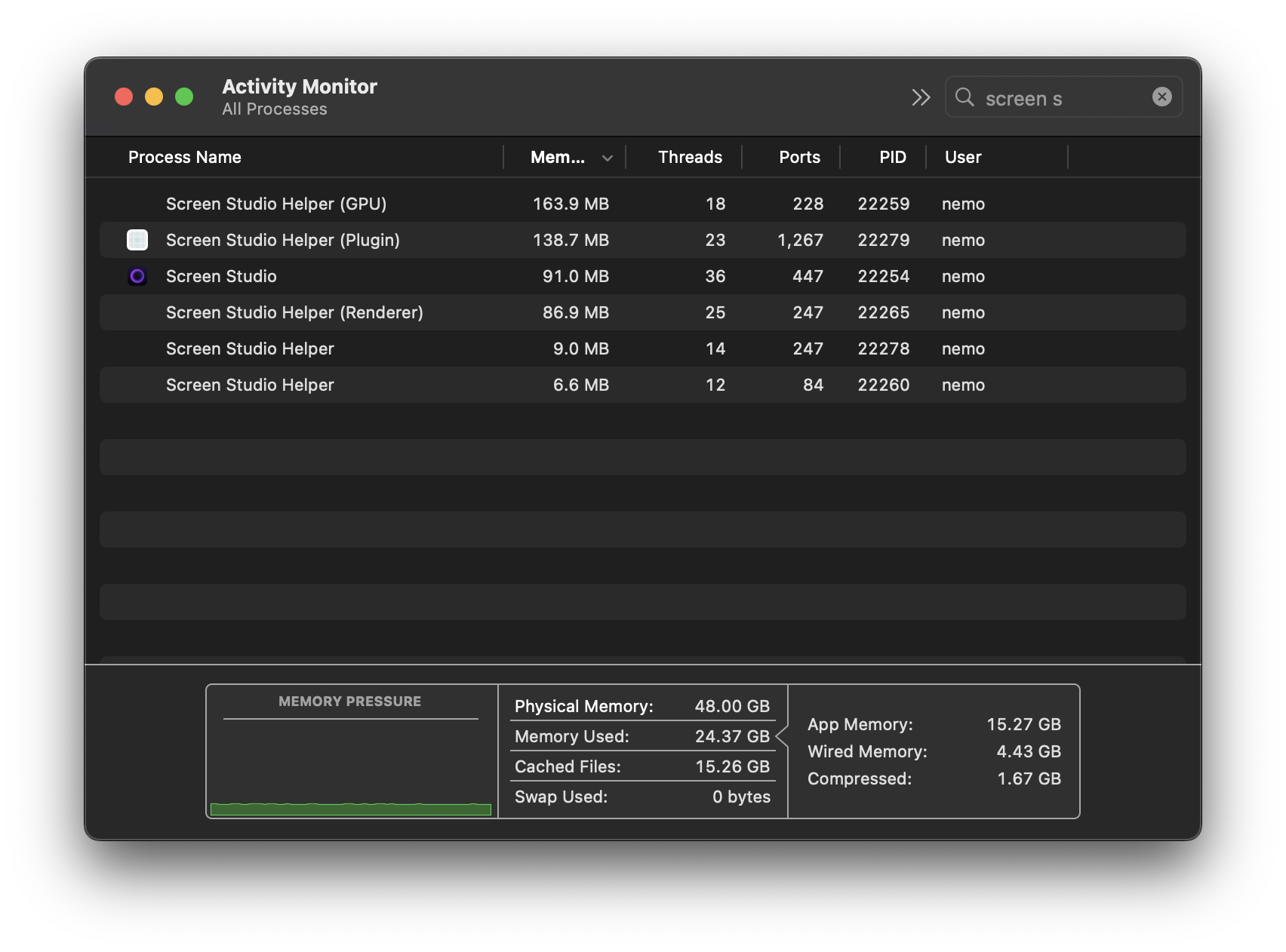
Screen Studio is the most interesting one to tear apart. Open Activity Monitor after you launch it. Six processes. ~500MB of RAM combined. Sitting there. Doing nothing. The editor is a React app in a Chromium wrapper. They bundle ffmpeg and a bunch of native helpers stitched together with IPC. 367MB on disk.
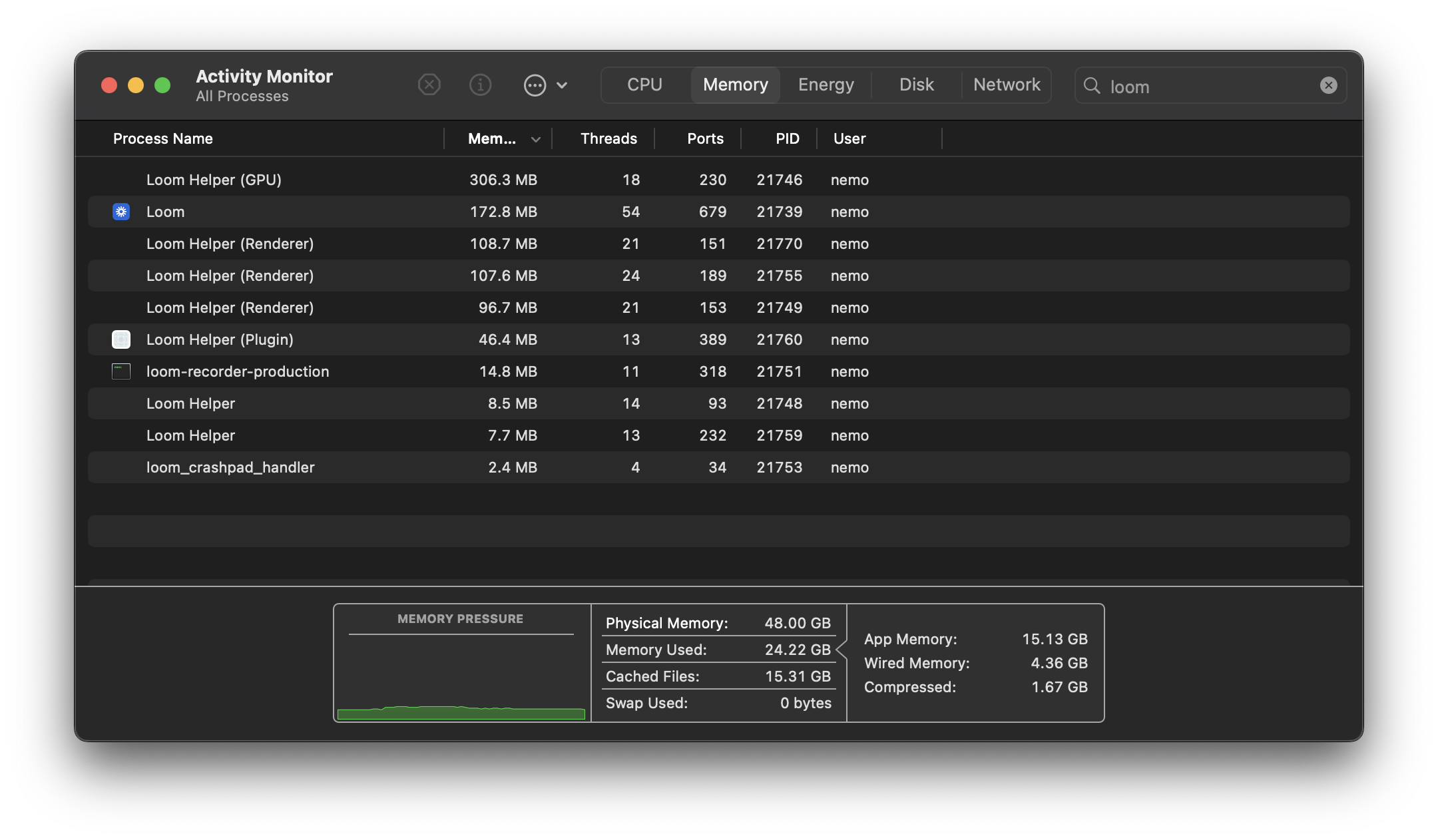
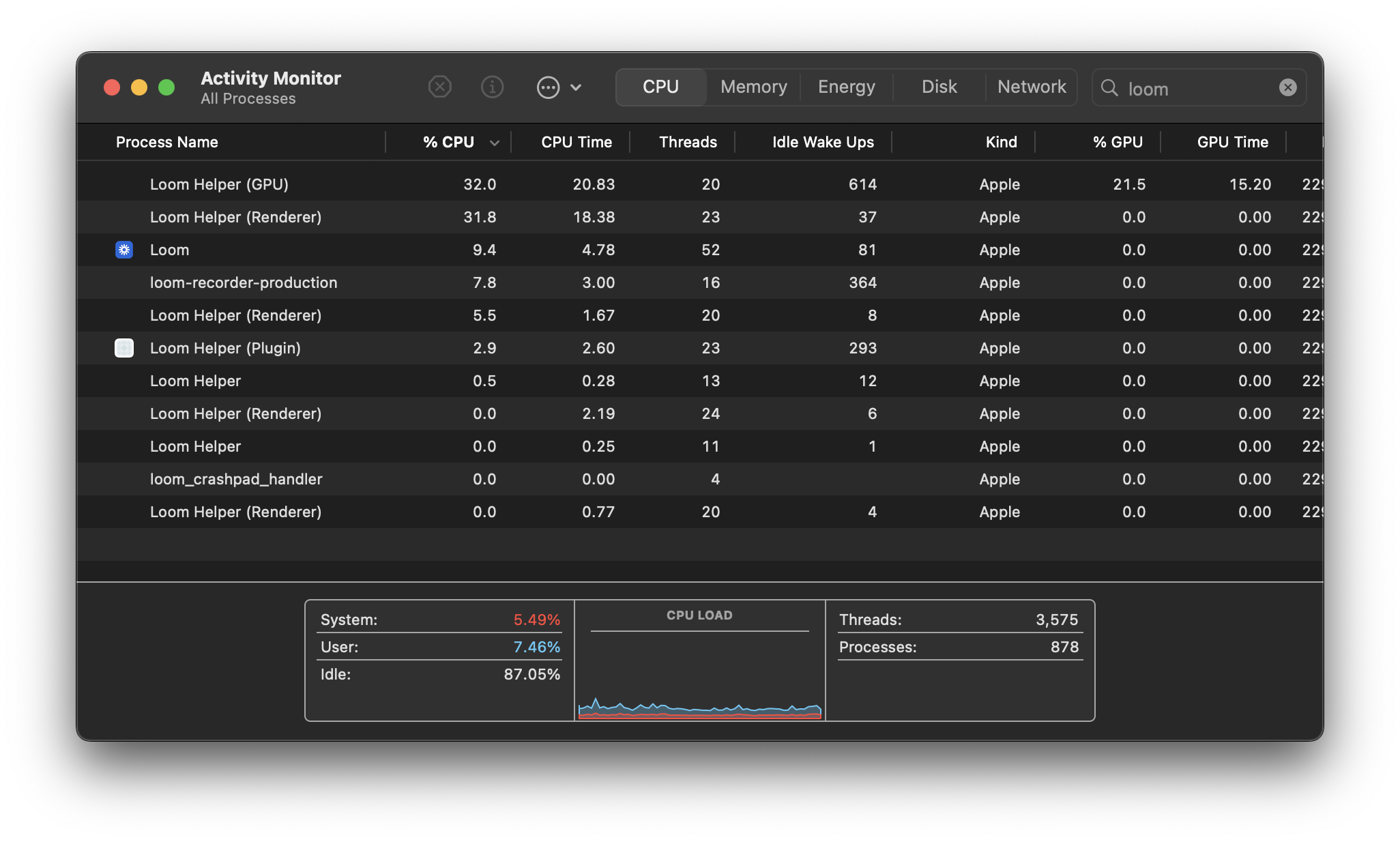
Loom is worse. Ten processes. ~875MB. Before you hit record.
Here’s the part that got me. To actually record your screen, Screen Studio’s Electron process spawns a separate Swift binary called polyrecorder. They already know native is better for the hard part. They just didn’t build the rest of it that way.
Why Electron Is Wrong for This
Screen recording is a real-time media pipeline. You’re capturing 30-60 frames per second, encoding video, recording audio from multiple sources, and writing to disk. Simultaneously. For minutes. Electron is built for Slack.
Export. Screen Studio renders each frame in WebGL, reads pixels back to CPU memory, pipes them to a spawned ffmpeg process, and encodes with libx264 on the CPU. Every frame crosses the GPU-CPU boundary twice. A 10-minute video takes about 7 minutes to export.
My app decodes with VideoToolbox, composites with Metal, and encodes with VideoToolbox. Pixels never leave the GPU. Same video, 2 minutes 48 seconds.
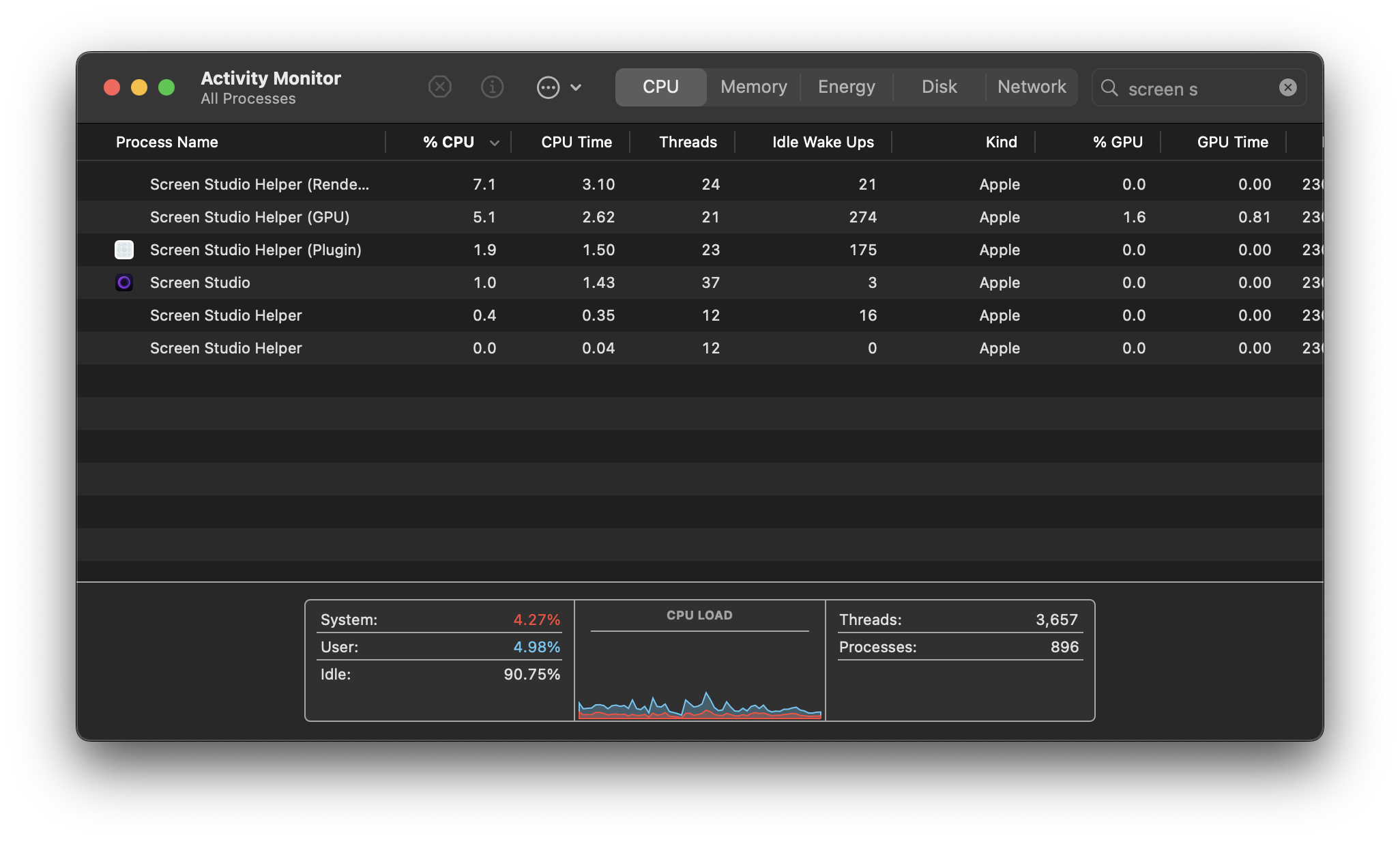
Recording CPU. Screen Studio’s native helper uses SCRecordingOutput to write frames straight to disk. Smart. ~16% CPU total across 6 processes. But they defer all the hard work to export. Recordings come out variable frame rate, so ffmpeg normalizes them later. They pay on export what I pay during recording.
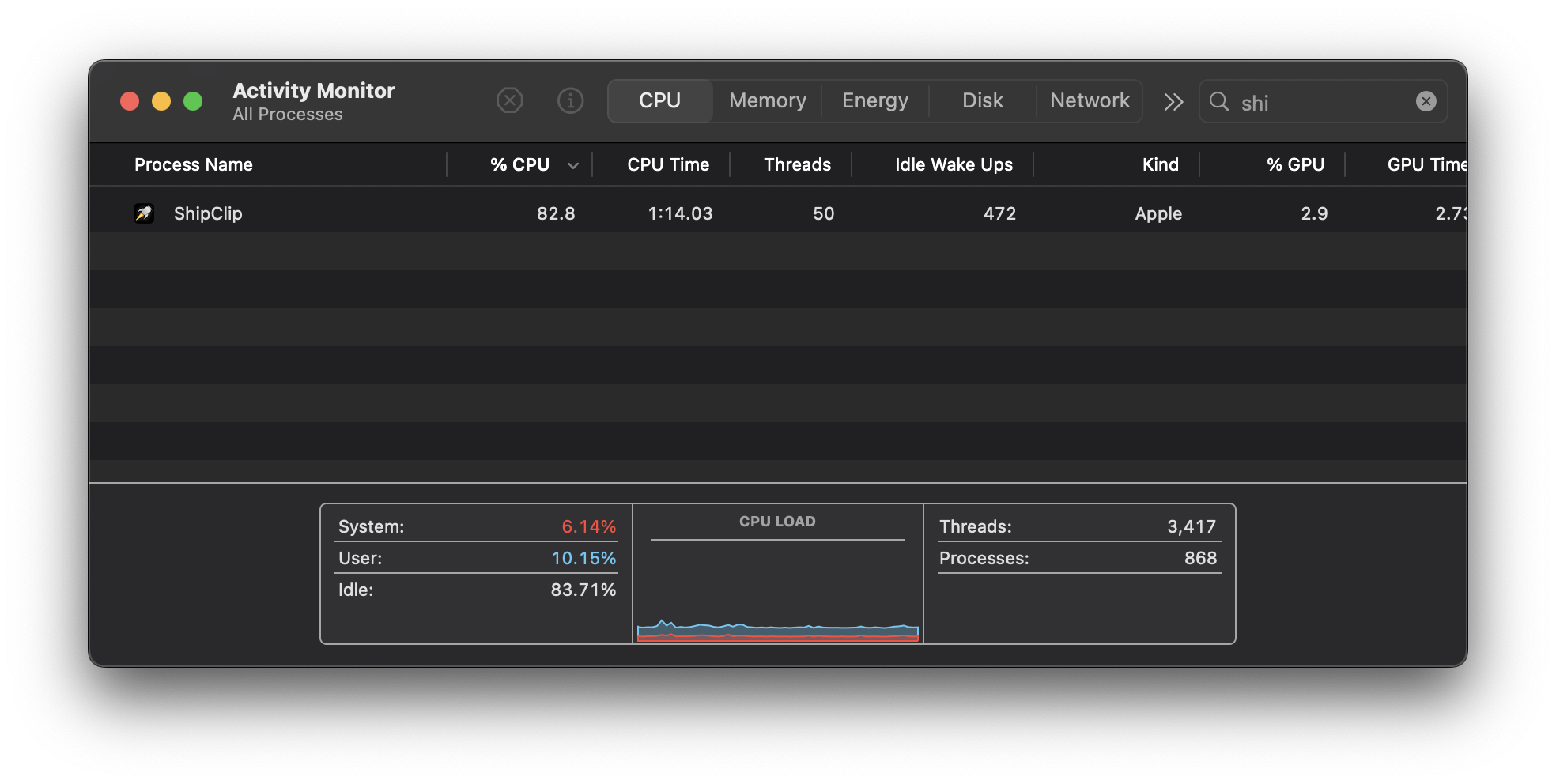
I run at 83% CPU while recording because I pad frames in real-time. Variable frame rate in, constant frame rate out. When export starts, there’s nothing to fix. The hardware encoder rips through it.
Loom? 89% across 11 processes. And it still can’t edit locally.
What Native Gets You
ScreenCaptureKit captures the screen. Apple ships it, optimized for their hardware. Every Electron recorder calls into this framework anyway, just through six layers of abstraction.
AVFoundation handles recording, playback, and export. Multi-track composition, audio mixing, hardware encoding. The same framework behind Final Cut. That means export is a single-pass hardware pipeline, not a CPU-bound ffmpeg job.
Metal renders the effects. Zoom, camera PiP, annotations, backgrounds. Same compositor for preview and export, so the final video matches what you saw while editing. No surprises.
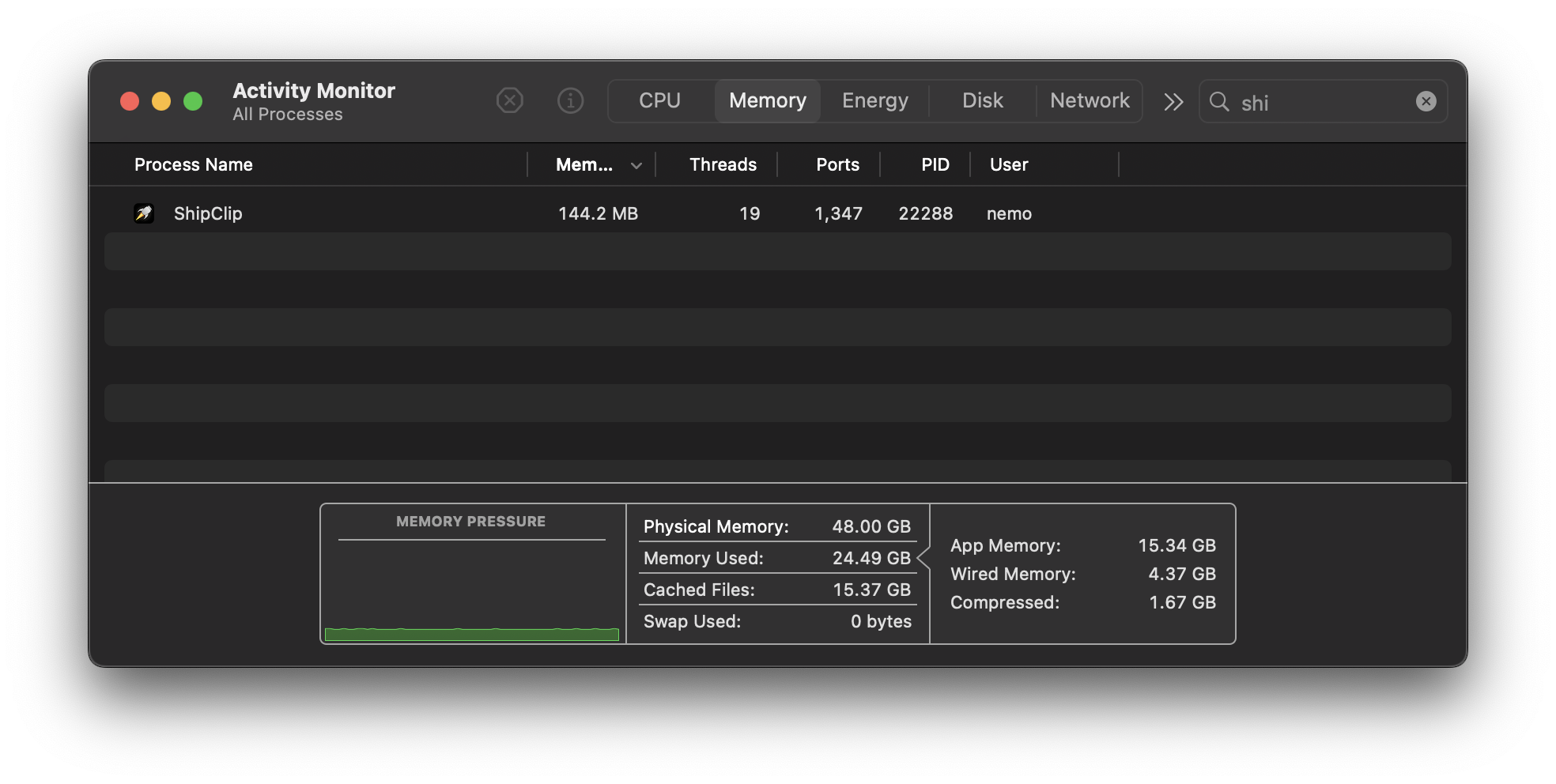
The whole app is 6MB on disk. One process. 144MB of RAM.
The Hard Parts
Native comes with its own pain.
Multi-track audio sync. Screen audio, mic, and camera each write to their own file via separate AVAssetWriter instances. If system audio drifts 40ms from the mic, viewers notice. I spent days getting timestamp management right.
The Metal compositor. AVVideoCompositing gives you a protocol for custom frame rendering. Sounds clean. In practice, you’re managing Metal command buffers, texture caching, coordinate transforms, and a pipeline that can’t drop frames at 30fps. Annotations add SDF rendering for shapes and Core Text rasterization for text, cached by content hash so you’re not rebuilding textures every frame. This one took the longest.
Real-time person segmentation. I wanted camera background removal without a green screen. Apple’s Vision framework does person segmentation, but at full resolution you get maybe 10fps. I downscale to 480x270 via Accelerate, feed that to Vision, and hit ~30fps. If it fails, the app falls back to post-processing in the editor. A month of profiling for one feature.
VPIO echo cancellation. If you record your voice while system audio plays through speakers, you need echo cancellation. Apple’s Voice Processing I/O audio unit handles this. The documentation is borderline fictional. The unit creates an internal aggregate device that combines your mic and speakers, and the channel count changes depending on what’s plugged in. USB interfaces, Continuity Camera, Bluetooth headphones, virtual audio drivers from Steam or Teams. Each combination produces different behavior. Some silently fail and fall back to no echo cancellation. Some kill audio data entirely. The API doesn’t work with non-default devices in ways that aren’t documented anywhere. I wrote a standalone test harness and brute-forced every device combination on my desk to find the working path.
Frame rate bugs. ScreenCaptureKit lets you set a target frame rate. In theory. In practice, there are 14-year-old bugs in AVFoundation where the actual frame rate you get is whatever CoreMedia feels like delivering. ScreenCaptureKit makes it worse by not generating frames when the screen is static to save power. Frames arrive at variable intervals regardless of what you request. That’s why I pad frames during recording. If I didn’t, zoom timing, annotation placement, and audio sync would all break. These bugs are old enough to be in high school.
ScreenCaptureKit is young. Shipped in macOS 12.3. The documentation is thin. Stack Overflow has maybe 200 questions total. Window capture breaks with transparent windows. Display switching mid-recording can crash the stream. You work around it.
The Numbers
| ShipClip | Screen Studio | Loom | |
|---|---|---|---|
| RAM at idle | 144MB | ~500MB (6 processes) | ~875MB (10 processes) |
| Disk size | 6MB | 367MB | 207MB |
| 10min 1080p export | 2:48 | ~7:00 | N/A (cloud only) |
| Recording CPU | 83% | ~16% (6 processes) | ~89% (11 processes) |
| Export encoding | Hardware (VideoToolbox) | Software (libx264) | Server-side |
| Processes | 1 | 6 | 11 |
I’ll take 83% recording CPU for 2:48 exports over 16% recording CPU and 7 minutes of waiting.
The Honest Gaps
Screen Studio has been shipping for years. They’ve squashed bugs I haven’t found yet, polished edges I haven’t touched, and built features I’m still working toward. That’s what a team and a head start buys you.
But they’ll never ship a 6MB app. That’s what architecture buys you.
Why This Matters
Apple ships world-class frameworks for media capture, editing, and rendering. ScreenCaptureKit, AVFoundation, Metal, VideoToolbox, Vision. Fast, efficient, designed for exactly this use case.
And yet every “Mac app” in this space is a web app stapled onto Chrome through Electron.
The frameworks are right there. Use them.
ShipClip is what I built. Native Swift, 6MB, no Chromium.